University beginning next phase of project to retire CTools
This semester marked a major milestone for teaching and learning at U-M: All course sites moved from CTools to Canvas, a more capable system that has earned praise from faculty and students.
But the work is not done yet.
more information
Information and Technology Services is now shifting its focus to decommissioning CTools Project Sites by late 2017.
Project sites, commonly used for file storage, research support, and collaboration, account for more than half of the content stored on CTools. Although about 60,000 such sites exist today, less than 10 percent of them were accessed in the past year.
“Use of CTools Project Sites continues to decline — likely the result of several newer collaboration tools being available to campus. Most people find that tools like U-M Google and U-M Box better meet their needs,” said Sean DeMonner, executive director of ITS Teaching & Learning.
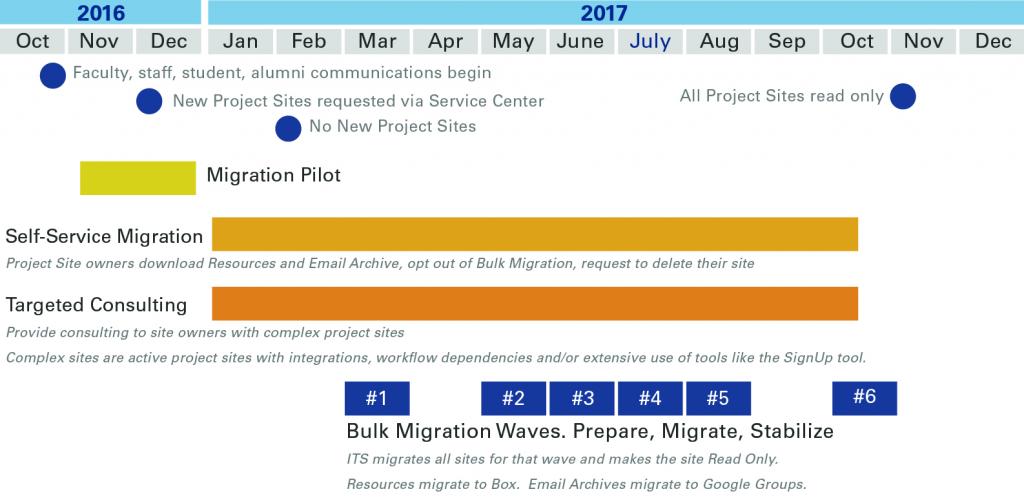
In a pilot that starts this fall, several academic and administrative units will use a tool developed by ITS to move content out of CTools and into Box and Google.
Beginning in December, new CTools Project Sites can only be created upon request to the ITS Service Center. In February, the ability to create a new project site will be disabled completely.
Take Action Now:
Delete Obsolete Project Sites
If you no longer need your project site contents, ITS encourages you to delete them:
1. Log in to CTools. Click My Workspace in the top navigation.
2. Click Worksite Setup in the left menu.
3. Click the box next to the sites you wish to delete. NOTE: You can only delete sites you created or own.
4. Click Delete at the top of the window.
Early next spring and into fall 2017, ITS will bulk migrate project site resources to Box. Site owners will also have access to self-service tools to download their content, have their site deleted, or request their content not be bulk migrated.
Owners of training sites may request their content be moved to Canvas. Training and help guides will aid in the transition.
ITS is working with Migration Champions in each unit to provide support. Migration Champions determine when their unit migrates and partner with ITS to communicate and provide training.
“Any large-scale change requires support from many individuals across our campus,” DeMonner said. “Canvas was a success due in large part to our partnerships with individuals in each school and college. We plan to use a similar model as we move project sites to other solutions.”